
Introduction↗
New requirements emerged that called for the addition of two graphical components to our monolithic scientific desktop application, which had been developed using unmanaged C++ and MFC for its user interface. These two components were:
- A graphics component for displaying 2D curves representing computation results.
- A domain-specific graphical component that was already available internally but had been developed in C#.
This provided an opportunity to evaluate the introduction of C# and determine how it could improve the user interface. Naturally, this transition required some architectural changes to the existing MFC codebase. The following section describes this journey.
Architecture Overview↗
We can see with the following class diagram that several classes are needed to perform the link between the C# and C++ words.
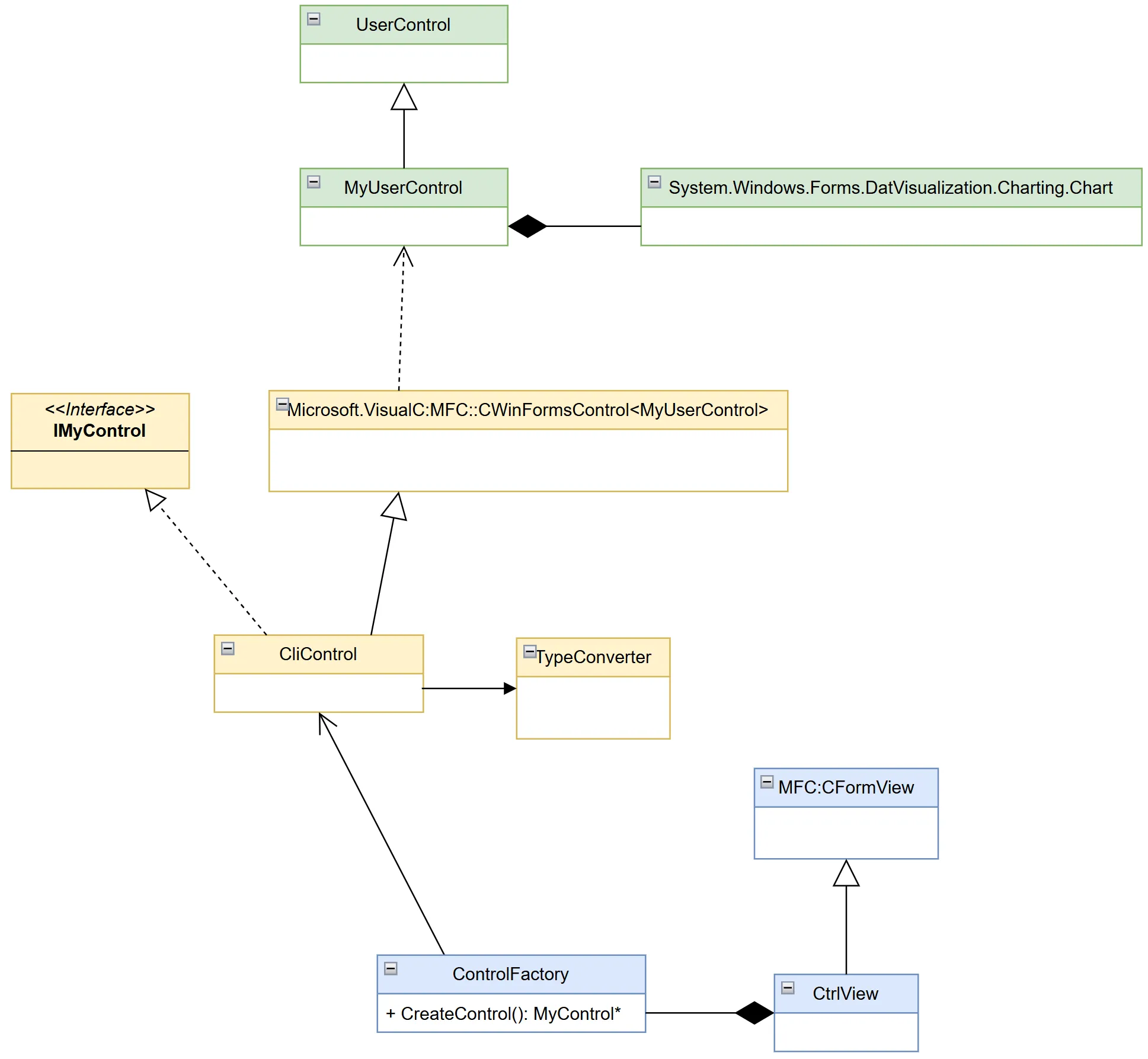
Actually 3 different layers are used:
- C#
- C++ CLI
- C++ unmanaged
C# Layer↗
The C# part is the first layer directly in contact with the C# control we want to use. It Defines a MyUserControl class that must derivate from the Microsoft class Systen.Windows.Forms.UserControl. This custom control can then embed the C# control and add any extra logic needed (like missing functionality).
C++ CLI↗
The heart of this layer is the Microsoft::VisualC::MFC::CWinFormsControl template class provided by Microsoft that build a kind of wrapper around a C# UserControl that can be used within the CLI world.
The implementation of this contract is done in the concrete class written in CLI: CliControl.
We need also some utility classes (TypeConverter…) either to define again some logic or to do some type conversion between the C# world and the C++ unmanaged one.
Due to compiler rules, the ControlFactory class is also built within the CLI world even if it uses only standard C++ syntax.
IMyControl* ControlFactory::CreateControl(int nCtrlID, CWnd* pParent)
{
    IMyControl *pResult = new CliControl();
    pResult->CreateControl(nCtrlID, pParent);
    return pResult;
}
The main goal of this factory is to create the CLI Control and to return a C++ only interface that will be usable from MFC side.
C++ unmanaged↗
The main part of this final layer is of course the pure interface IMyControl. This interface defines the external contract to use in order to communicate with our C# component. It must be defined for the C++ world only. You should avoid here using MFC objects.
Finally, we can implement our own MFC view (CtrlView) by deriving it either from CFormView or directly from CView direct.
The MFC View↗
Once everything is in place, embedding the control within a MFC view is straight forward.
First, you define your frame with the place where you want to display your control.
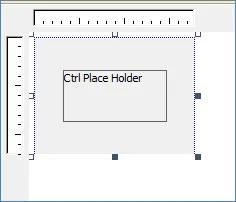
Then overwriting the OnInitialUpdate method of the view allows the control to being created.
void CtrlView::OnInitialUpdate()
{
    CFormView::OnInitialUpdate()

    if(!m_pMyCtrl)
    {
        ControlFactory oFactory;
        m_pMyCtrl = oFactory.CreateControl(IDC_CTRL_PLACE_HOLDER, this);
    }
}Events↗
Forwarding events from C# is also a needed feature to control up the MFC layer. You may also want to forward events from you C# control up to your MFC layer. As you may know C# uses delegates for event propagation. Several macros are provided by Microsoft that helps doing this connection.
In your header file CliControl.h the desired delegate is specified with the expected handler.
class CliControl:
       public Microsoft::VisualC::MFC::CWinFormsControl<MyUserControl>,
       public IMyControl

{
…
void OnMouseUp(	System::Object^ sender,
		System::Windows::Forms::MouseEventArgs^ e);

BEGIN_DELEGATE_MAP(CMSChartCtrl)
  	EVENT_DELEGATE_ENTRY(OnMouseUp, System::Object^,
		             System::Windows::Forms::MouseEventArgs^)
END_DELEGATE_MAP()
…
}
In the .cpp file, once the control is created, the handler is connected to the delegate.
IMyControl* CliControl::CreateControl(int nID, CWnd *pParentWnd)
{
    IMyControl *pResult(nullptr);
    BOOL bResult = CreateManagedControl(WS_VISIBLE | WS_CHILD, nID, pParentWnd
    if(bResult)
    {
        GetControl()->Chart->MouseUp +=
             MAKE_DELEGATE(System::Windows::Forms::MouseEventHandler, OnMouseUp);

        pResult = this;
    }

    return pResult;
}
Pros & Cons↗
When developing on a C++ with the MFC framework, looking at all modern user interface applications can sometimes lead to some disappointment. Using C# component in unmanaged code appears to be a good compromise. Fancy component can be used to ameliorate user experience (such as graphics, data grids…). Once the implementation is done, which is clearly the hardest part, other add-on are quick to integrate.
Nevertheless, the CLI layer, which is clearly the wrapper one, is cumbersome. Sending data from the unmanaged world to the C# one (and vice versa) are not straight forward and not easy to maintain. That is why the IMyControl interface should be as stable as possible to avoid too many changes.
Conclusion↗
The architecture presented above shows that C# graphical components can be integrated within existing MFC applications. Using this approach, we can take benefit of new features available only in C# world and continue improving our legacy application without the need for disruptive changes.