
Introduction↗
This article was originally published on the CodeProject website. Below is the initial version.
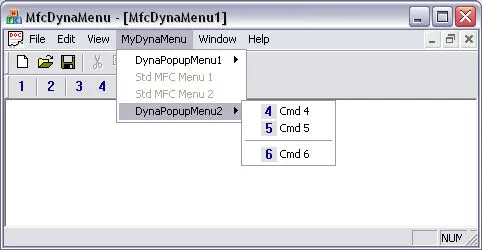
This article deals with a subject that has already been treated several thousands of times. Actually, it does not bring anything really new regarding the integration of dynamic menus within a MFC Application since I have re-used a lot of existing pieces of code. But I decided to publish my modest contribution in order to share my experience gained while developing the two following topics:
The configuration of the menus and toolbars from an external XML file. The creation of a bitmap by the concatenation of multiple external BMP files.
Background (optional)↗
A lot of samples treating this subject have already been published, and I took advantage of these previous developments.
Two main articles help me to start: CreatingDynamicToolbars and DynaMenuToolbar.
Thanks also to all the others.
How it works↗
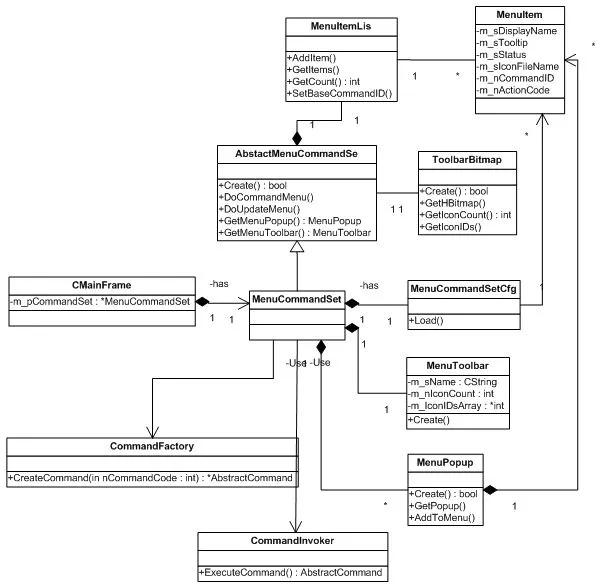
The main idea is to embed a MenuCommandSet into the CMainFrame of the application.
The MenuCommandSet will create the toolbar bitmap, handle click actions, display the toolbar button tooltips, and display the status bar message.
The class diagram below gives an idea of the implementation:
Using the Code↗
I did not put my code into a library, but it can be easily re-used by copying the sub directory called commands into any MDI (or SDI) project.
To establish the connection properly, CMainFrame must be modified as described below:
First, create a MenuCommandSet directly in the constructor.
// in MainFrame.h you add a private member
private:
	MenuCommandSet* m_pMenuCommandSet;


// that you can create directly in the constructor
CMainFrame::CMainFrame()
{
	m_pMenuCommandSet=	new MenuCommandSet();
}

// ... and destroy when finished
CMainFrame::~CMainFrame()
{
	delete m_pMenuCommandSet;
}

// The initialization of the `MenuCommandSet` is made at the frame creation
int CMainFrame::OnCreate(LPCREATESTRUCT lpCreateStruct)
{
	if (CMDIFrameWnd::OnCreate(lpCreateStruct) == -1)
		return -1;

	if(NULL==m_pMenuCommandSet)
		return -1;

	//check creation of the command set as it may fail in case the xml file is lost or corrupted
	if(false==m_pMenuCommandSet->Create("the_cfg_file_to_use.xml", COMMAND_SET_BASE_ID))
		return -1;

	//get the handle on the toolbar bitmap dynamically created
	HBITMAP hBitmap= (HBITMAP)m_pMenuCommandSet->GetToolbarBitmap().GetHBitmap();
	//check if creation has been successfull
	if(NULL==hBitmap)
		return -1;

	...
}
Now that the initialization has been made, we use it to create and initialize our dynamic toolbar.
int CMainFrame::OnCreate(LPCREATESTRUCT lpCreateStruct)
{
	...

	//then create ask for the first dynamic toolbar
	MenuToolbar* pToolbar= m_pMenuCommandSet->GetMenuToolbar(MenuIdToolbar1);
	if(pToolbar)
	{
		//create the toolbar control
		if (!m_wndDynaToolBar.CreateEx(this, TBSTYLE_FLAT, WS_CHILD | WS_VISIBLE | CBRS_TOP
			| CBRS_GRIPPER | CBRS_TOOLTIPS | CBRS_FLYBY | CBRS_SIZE_DYNAMIC) )
		{
			TRACE("Failed to create m_wndToolBar2\n");
			return -1;      // fail to create
		}
		//attach the dynamic bitmap to the toolbar
		m_wndDynaToolBar.SetBitmap(hBitmap);
		//intialize it with the buttons found in the XML configuration file
		m_wndDynaToolBar.SetButtons(pToolbar->GetIconIDs(),
		  			 pToolbar->GetIconCount());
	}

	...

	m_wndDynaToolBar.EnableDocking(CBRS_ALIGN_ANY);
	EnableDocking(CBRS_ALIGN_ANY);
	DockControlBar(&m_wndDynaToolBar);

	...
}
Then we add the hooks to display the message string into the status bar
void CMainFrame::GetMessageString(UINT nID, CString& rMessage) const
{
	if(m_pMenuCommandSet && m_pMenuCommandSet->IsInRange(nID)){
		MenuItem oItem;
		if(true==m_pMenuCommandSet->GetMenuItem(nID, oItem)){
			rMessage= oItem.GetStatus();
		}
		return;
	}
	CMDIFrameWnd::GetMessageString(nID, rMessage);
}
To show a tooltip for each button of the toolbar.
BEGIN_MESSAGE_MAP(CMainFrame, CMDIFrameWnd)
    ...
    ON_NOTIFY_EX(TTN_NEEDTEXT, 0, OnShowTooltips)
    ...
END_MESSAGE_MAP()


BOOL CMainFrame::OnShowTooltips(UINT id, NMHDR *pNMHDR, LRESULT *pResult)
{
	id;			//parameter not used
	pResult;	//parameter not used
    TOOLTIPTEXT* pTTT = (TOOLTIPTEXT*)pNMHDR;
    UINT nID =			(UINT)pNMHDR->idFrom;

	CString sToolTip;
	CString sFullText;
	if(m_pMenuCommandSet && m_pMenuCommandSet->IsInRange(nID))
	{
		MenuItem oItem;
		if(true==m_pMenuCommandSet->GetMenuItem(nID, oItem)){
			sToolTip= oItem.GetTooltip();
		    strcpy_s(pTTT->szText, sizeof(pTTT->szText), (LPCTSTR)sToolTip);
		}
		return TRUE;
	}

    if(nID){
		sFullText.LoadString(nID);
		::AfxExtractSubString(sToolTip, sFullText, 1, '\n');
		strcpy_s(pTTT->szText, _countof(pTTT->szText), sToolTip);
		return TRUE;
    }

    return FALSE;
}
And of course, to handle clicks on our dynamic menus.
BOOL CMainFrame::OnCmdMsg(UINT nID, int nCode, void* pExtra, AFX_CMDHANDLERINFO* pHandlerInfo)
{
	if(NULL==pHandlerInfo)
	{
		// Filter the commands sent to Window menu
		if(m_pMenuCommandSet && m_pMenuCommandSet->IsInRange(nID))
		{
			if (nCode == CN_COMMAND){
				// Handle WM_COMMAND message
				m_pMenuCommandSet->DoCommandMenu(nID);
			}else if (nCode == CN_UPDATE_COMMAND_UI){
				// Update UI element state
				m_pMenuCommandSet->DoUpdateMenu(nID, (CCmdUI*)pExtra);
			}
			return TRUE;
		}
	}

	return 	CMDIFrameWnd::OnCmdMsg(nID, nCode, pExtra, pHandlerInfo);
}
In order to avoid collisions with other standard messages do not forget to reserve a bunch of ids directly within the resource.h file.
The first one (ID_CMDSET_RESERVED_1) is given to the MenuCommandSet to let it know which commands it should handle.
//in resource.h

#define ID_CMDSET_RESERVED_1            32770
#define ID_CMDSET_RESERVED_2            32771
#define ID_CMDSET_RESERVED_3            32772
#define ID_CMDSET_RESERVED_4            32773
#define ID_CMDSET_RESERVED_5            32774
...

//in CMainFrame::OnCreate()
	if(false==m_pMenuCommandSet->Create("the_cfg_file_to_use.xml", COMMAND_SET_BASE_ID))
		return -1;
If you want to insert some menus inside the main menu bar you define On Update Command Handler, where you can insert the popup menu you have defined.
BEGIN_MESSAGE_MAP(CMainFrame, CMDIFrameWnd)
   ...
   ON_UPDATE_COMMAND_UI(ID_DYNA_POPUP_MENU1, OnUpdateDynaMenu1)
   ...
END_MESSAGE_MAP()


void CMainFrame::OnUpdateDynaMenu1(CCmdUI* pCmdUI)
{
	pCmdUI; //parameter not used
	CMenu* pMenu= _GetDynaPopupMenu1();
	if(pMenu && m_pMenuCommandSet)
	{
		MenuPopup* pMenuPopup= m_pMenuCommandSet->GetMenuPopup(MenuIdPopup1);
		if(pMenuPopup){
			pMenuPopup->AddToMenu(pMenu);
		}
	}
}Improvements↗
-
This code has been initially created to be used with Stingray [Rogue Wave] Library. Using this library, you can share a single bitmap between several toolbars, which is not the case in pure MFC. To handle several dynamic toolbars we should move
ToolbarBitmapat theMenuToolbarlevel. -
The creation of the menus read from the XML file could be more generic.
-
The search of menus for the insertion of the popups into the main menu bar could also be more generic.