
Introduction↗
This article was originally published on the CodeProject website. Below is the initial version.
In order to improve the quality of our code, I researched off-the-shelf code metrics tools and ultimately selected Source Monitor by Campwood Software.
When we first ran the tool on our existing codebase (approximately 260,000 lines of C++) we discovered that the Maximum Complexity metric (M9) reached values as high as 100, far exceeding the recommended range of [0…10].
Due to time constraints we decided to focus solely on new developments rather than refactoring the existing code.
However, this raised an immediate question: How can we report metrics for only the newly developed code, without being skewed by out-of-bound metrics from legacy code?
Additionally, I aimed to:
- Automate metric checks to integrate them into our automated build process.
- Trigger alerts if newly produced code fails to meet the default recommended rules.
Prerequisite↗
The SMAnalyzer task has been developed using NAnt 0.85 and for Source Monitor 2.5.
Obviously, you need to have these two tools installed on your machine.
The SMAnalyzer task described in this article has been developed to parse details XML files generated by Source Monitor.
You will have to generate these files yourself. Please have a look at Source Monitor online help which is very clear.
Source Monitor implements the concept of checkpoints that allow monitoring your metrics over time.
This first version of SMAnalyzer does not handle several checkpoints within a Source Monitor file. It always uses the first checkpoint found within the XML structure.
Concept↗
The initial idea is to define:
- For new code: Default thresholds for all Source Monitor Metrics.
- For legacy code: Exceptions to manage codes that are out of bounds from the default thresholds.
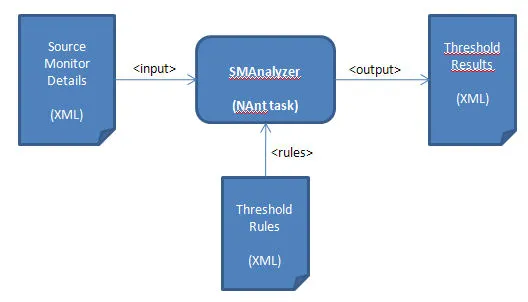
The task simply processes an existing Source Monitor XML file and checks for rules also specified using XML format.
Using the Code↗
If you directly use the NAnt.SMAnalyzerTasks.dll assembly, You just have to copy it into the bin folder of your NAnt installation folder. If you prefer to rebuild it please see the section ‘How to build the task’ below. Once the SMAnalyzer task is ready you can use it in any scripts with the simple command below:
<smanalyzer input=".\sm_details_result.xml" rules=".\threshold_rules.xml" output=".\threshold_results.xml" />The input attribute is used to specify the Source Monitor XML details result file.
The rules attribute is used to specify the XML file containing the rules to apply while checking the results.
The output attribute is used to specify the file where the check results are stored.
Threshold rules XML syntax↗
The syntax used to define the thresholds is summarized by the code sample below:
<sourcemonitor_thresholds>
  <project version="1.0">
     <project_name>my project</project_name>
     <project_directory>D:\dev\my_project</project_directory>
     <defaults>
        ....
        <metric id="M9" value=""><threshold min="0" max="10"/>
        ....
     </defaults>
     <customs>
        <files>
           <file file_name="foo1.cpp">
              <metric id="M9" value=""><threshold min="0" max="20" enable="true"/></metric>
              ...
           </file>
           <file file_name="foo2.cpp">
              <metric id="M9" value=""><threshold min="0" max="100" enable="true"/></metric>
              ...
           </file>
           <file file_name="foo3.cpp">
              <metric id="M9" value=""><threshold min="0" max="0" enable="false"/></metric>
           </file>
           ...
        </files>
     </customs>
  </project>
</sourcemonitor_thresholds>
project_name and project_directory tags are just here as a reminder of the Source Monitor file treated.
The two main interesting sections are defaults and customs:
In the defaults section you define a threshold for each metric you are interested in. The rule defined here applies by default for each file of the project.
In the customs section you can set an exception for each metric checked on each file. Any exception reported here will overwrite the default threshold. You can either disable the check totally or specify another range.
Result file XML syntax↗
The results of all checks are also saved using XML format. The skeleton given below summarizes the information reported:
<threshold_results>
  <files>
    <file file_name="foo1.cpp">
      <metric id="M9" value="9"><threshold min="0" max="20" result="good" /></metric>
      <metric id="M13" value="2.29"><threshold min="0" max="10" result="good" /></metric>
    </file>
    ...
    <file file_name="foo4.cpp">
      <metric id="M9" value="12"><threshold min="0" max="10" result="bad" /></metric>
      <metric id="M13" value="2.18"><threshold min="0" max="10" result="good" /></metric>
    </file>
    ...
  </files>
  <project>
    <project_name>my project</project_name>
    <sourcemonitor_version>2.5</sourcemonitor_version>
  </project>
  <statistics>
    <global total_count="71" error_count="4" success_count="67" />
  </statistics>
</threshold_results>
For each metric of each file, you have the final result of the check: good or bad. To facilitate the reading, we report the metric value computed by Source Monitor. At the end of the XML structure, we repeat some project information. And we put some statistics for a quick overview of the checks.
Post processing↗
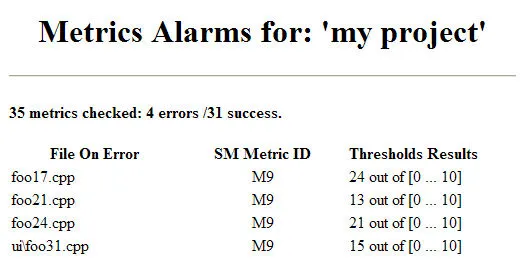
As the results are generated in XML format, they can easily be treated by some other tools for extra analyze. In the downloadable archive you will find a XSL Style Sheet (thresholds_results.xsl) that processes the result file in order to build an HTML page that can be posted on your web server. You can also imagine sending a mail to alert your development team when something starts going wrong, etc…
Handling legacy code↗
As mentioned earlier, one requirement was to remove noise bring by legacy code that is reported as out of bound.
This can be now easily achieved by defining correct exceptions rules within the rules file.
For instance, let say that file foo.cpp is reported with a Maximum Complexity of 40. You can define the exception below:
     <customs>
        ...
        <files>
           <file file_name="foox.cpp">
              <metric id="M9" value=""><threshold min="0" max="40" enable="true"/></metric>
              ...
           </file>
        ...
        </files>
     </customs>
With such a rule the file will not be reported in error except if new developments within this file deteriorate the score.
How to build the task↗
The NAnt task has been created with Visual Studio 2008 SP1 and is based on NAnt version 0.85. Framework 2.0 has been used.
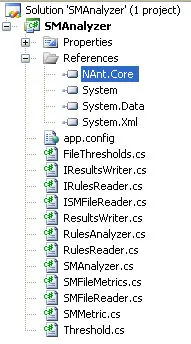
To build the task you just have to load the SMAnalyzer.sln solution within Visual Studio. You may need to add the reference to NAnt.Core.dll that can be found in the bin folder of your NAnt installation. Once the library is built just copy it into the NAnt bin directory.
Improvements↗
- As of today,
block_depthssections from Source Monitor are not supported. - Only the first checkpoint is supported by the task. Is it worth being able to read several of them ?
- I would be nice to generate automatically exception rules that ‘switch off’ out of bound legacy code. May be with a dedicated XSL ?
- Metric M8 which is a string is treated the same way as the others … as a number … sorry.