

Introduction↗
The goal of this project is to remotely control two Snake Eyes modules mounted on a Raspberry Pi through a cloud application. The Pi is connected to the home network via Wi-Fi. The user accesses a Web Application hosted on Azure to control the movements of the Eyes.
I started this project as an exercise to learn and practice various technologies. It is an ongoing effort and I believe It will be a good candidate for adding new features over time.
It may not be particularly useful, but it should be fun.
This first article covers the initial idea and the associated feasibility phase.
All necessary code will be shared through this GitLab project.
B.O.M.↗
To reproduce this project you need the following parts
Hardware↗
- 1 Raspberry Pi: In my case a
Raspberry Pi 5runningDebian GNU/Linus 13 (Trixie) - 1 or 2 Snake Eyes Bonnets:
- mounting board for the connection.
- wires and connectors
For the setting up of the Snake Eyes bonnet(s), you can follow these excellent instructions by Phillip Burgess.
Software↗
- Visual Studio Code
- 1 Microsoft Azure Subscription
- Software stacks: C# (backend), Typescript/Angular (frontend), Python (Eyes on the Pi)
Regarding the software stack, Python was the natural choice as it is the language used to control the Eyes. C# and Typescript were the tools I’m most comfortable with for the cloud part.
Initial Design↗
As mentioned earlier, the initial idea was to remotely control an application running on the Raspberry Pi. The simplest solution would have been to use a local remote control (maybe Bluetooth based). But I thought it would be more interesting to control the eyes from anywhere.
The first question to answer was then: How do you access the Raspberry connected behind an internet box without compromising the security of the home ? After some research I decided to give a try to a solution based on: Azure Relay – Hybrid Connection.
The targeted architecture can then be summarized by the following diagram:
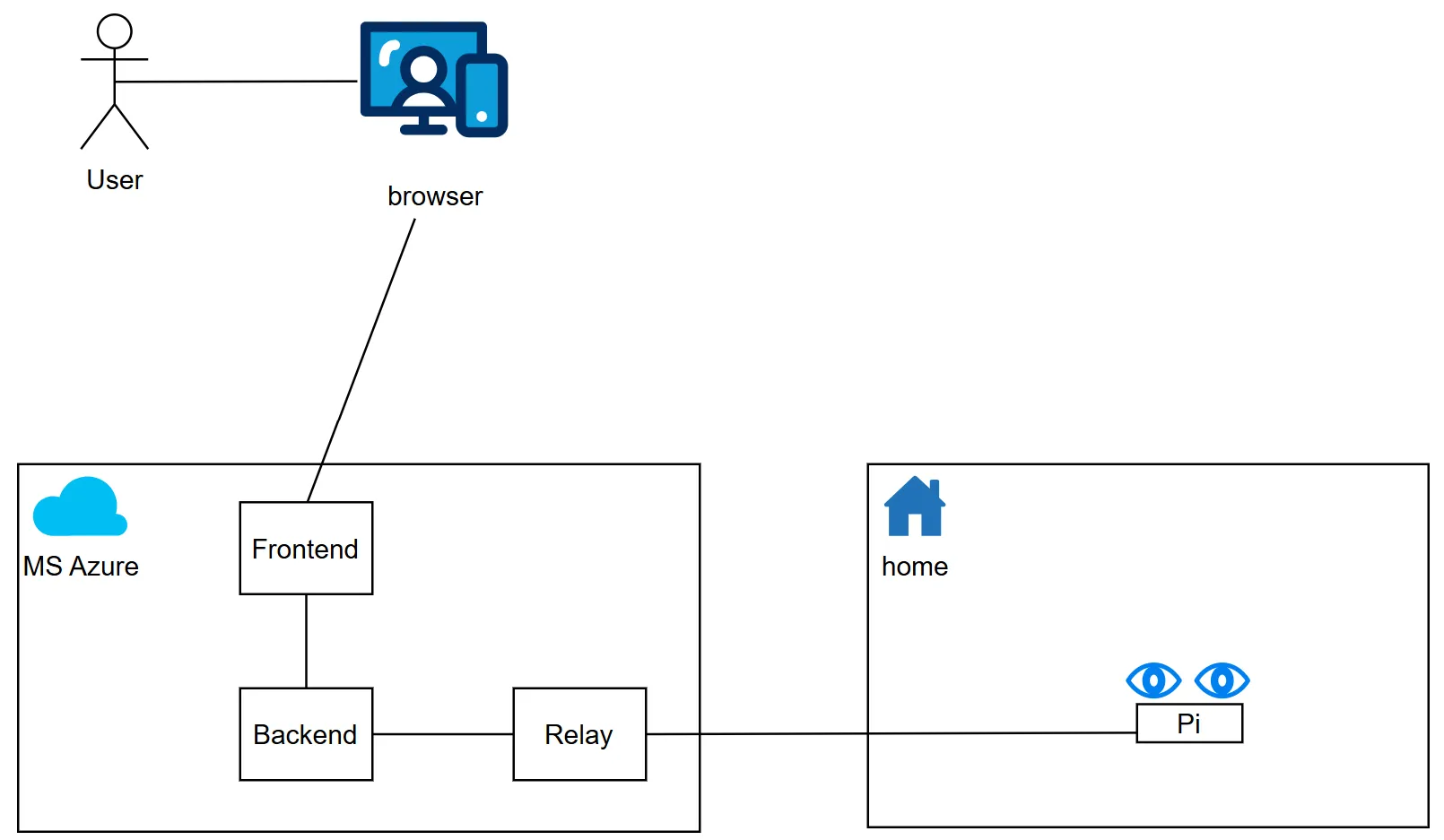
- The user uses a web application.
- Commands to execute are transmitted to the backend.
- The backend forwards the commands to Azure Relay.
- Azure Relay transmit them to the Raspberry PI.
- The eyes execute the movements.
Feasability↗
I have had the two eyes bonnets in my drawer for quite some time but never wired them up to test their behavior. Before building the full system and following the Baby Steps principle I decided to validate the concept with these three initial steps:
- Step 1: Test local communication through the Azure Relay.
- Step 2: Test communication between the backend and python client running on the Raspberry Pi.
- Step 3: Integrate the Python client within the
Pi_Eyesstack and start controlling the eyes.
Step - 1↗
The purpose of this step is to verify the communication between the backend and the Python components via the Azure Relay. This step does not even require using the Raspberry Pi: both components (backend & python) can be launched on the same machine.
First, you need to create an Azure Relay Namespace with a Hybrid Connection. You can do this by executing the create-azure-relay.ps1 script available in the repository. The script will print out several parameters that are required to configure the communication.
Please note that these are secrets and must be handled with care. Do not share them at all.
Once all parts are running you can verify the behavior by sending API calls with curl to the backend. Traces will then appear on the python side.
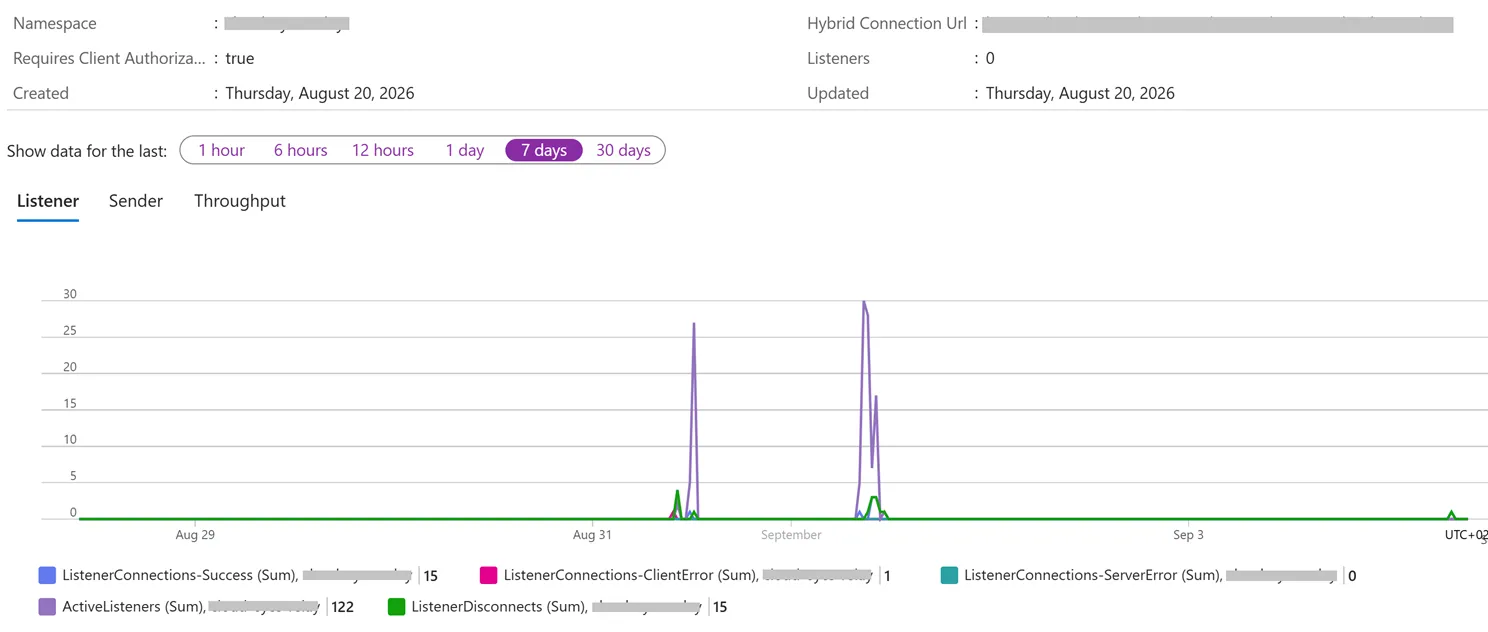
You can also check in Azure that the communication is going through the Hybrid Connection.
Step - 2↗
Once communication is validated locally it’s time to bring the Raspberry Pi in the picture. After installing and configuring The Python client script on the Raspberry Pi, it should also be able to establish the communication.
Step - 3↗
This part was more challenging.
The first step is to install the Pi_Eyes stack on the Raspberry Pi and figure out how to integrate our “remote controller” within this codebase.
I asked GitHub Copilot to do it for me, and it took me some time to realize that the proposed solution was not valid (maybe I was not clear enough…).
At this stage the Eyes Bonnet are still not yet connected. When the main service runs the eyes are displayed on any connected monitor. all troubleshooting can be done using this setup.
I started debugging the live system, mainly the Pi_Eyes service on the Pi and the system log became my best friend: sudo journalctl -u pi-eyes.service -n 50 --no-pager.
I realized that we could connect a joystick and use it to control the eyes movements…
The code handling the Joystick is cleanly encapsulated in a SnakeEyesBonnet thread class that exposes three variables (x,y,pupil) which are used in the infinite loop that handles the display of the eyes.
I then created a CloudRemoteBonnet class with the same interface as SnakeEyesBonnet, so that it could easily replace it with minimal modification of the original code.
By sending x,y,pupil values I started to control the eyes and see them obeying.
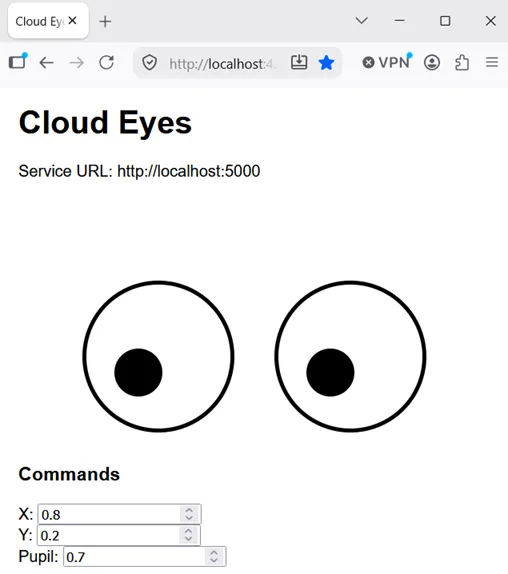
This concluded the feasibility step. The project can now proceed to the next phase.